SpexCode

Computable spec drift for coding agents.
SpexCode is a Git-backed spec tree and session manager for coding agents.
It is built around one problem: spec drift. Spec-driven development asks you to write the spec first and let agents implement it. The hard part comes afterwards. The code changes round after round, the spec is taken seriously once, and soon it no longer describes the system. A stale spec constrains nothing; it is an old document that still looks trustworthy, and nothing tells you when it stopped being true.
The usual answer is a workflow: always edit the spec before the code, and follow the steps. SpexCode does not rely on a workflow. It makes drift a fact that Git can compute. Each spec names the file or function it governs. When a later commit changes that code and leaves the spec alone, SpexCode names the spec and the commit. With the hooks installed, a change inside an anchored function is blocked until someone updates the spec or records why it still holds.
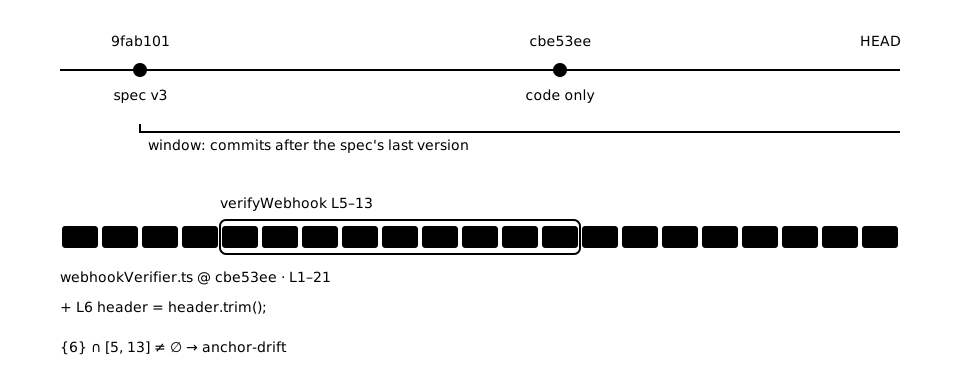
Keeping specs and code in sync explains the rule in full.
One project, three layers
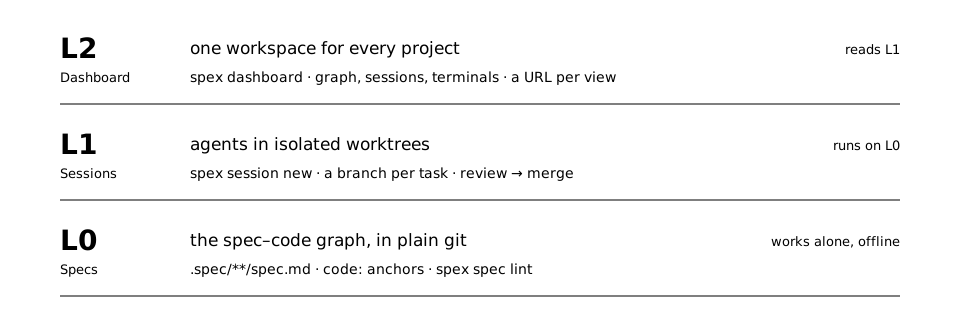
- The spec asset (L0) keeps intent next to the code in ordinary, reviewable Git files. It works offline, without a server or dashboard.
- The session substrate (L1) gives each agent its own branch and worktree, explicit lifecycle states, and a merge proposal a human reviews.
- The dashboard (L2) reads the same data: the graph, sessions, issues and live terminals. Anything it does, the CLI can do.
Each layer is useful without the ones above it. Start with the spec tree in one repository, and add sessions or the dashboard when parallel work makes them worth it.
Start from the agent you already use
The atlas plugin for Claude Code and Codex reads a repository, writes its first spec tree, draws a diagram for the nodes worth one, and hands back a page you can open. After installing it, run /atlas in any repository. PenguinHarness imports the same skill. Getting started has every install path, and Flatcode shows open-source repositories drawn this way.
Where to read next
Getting started covers the plugin and the CLI. Working with your agent explains direct use, managed sessions and the dashboard. The Prompts & guidance catalog collects the system contract, CLI help, hooks, skills and review guidance, and the Reference is projected from SpexCode's own spec tree.